The 70GB ghost: Hunting Down Mysterious Storage Usage in HAOS
TL;DR: A failed update left old Frigate recordings in /data/emergency, silently eating ~70 GB until cleaned up.
Thursday evening, new Home Assistant update, everything is cool… except it’s not.
Supervisor complains: Data disk is running low on free space.
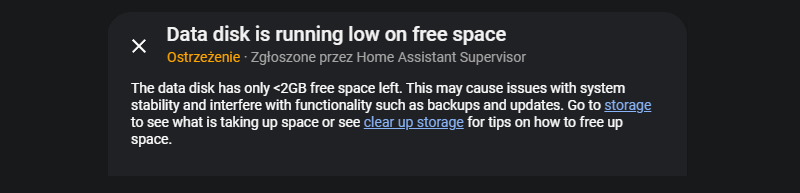
I thought "that’s weird, 128 GB of space should be plenty", but turns out it’s not. I go to System → Storage and see “System: 98.9 GB”.
What? How?
I went ahead and checked the usual culprits, but the database was 1.9 GB, addons were barely 7 GB, backups were kept on an external system… So none of that.
So I checked the supervisor itself.
I made sure that the SSH add-on had protection disabled. I first tried the documented login approach, but it dropped me into the add-on container rather than the host. Since docker ps was available, I attached directly to the Supervisor, which I knew would expose /data:
docker exec -it hassio_supervisor bashIn there, quick du -sh / allowed me to confirm how much space it uses:
826c72cb369e:/# du -d 1 -h | sort -h
0       ./dev
0       ./proc
0       ./sys
4.0K    ./home
4.0K    ./mnt
4.0K    ./opt
4.0K    ./srv
4.0K    ./tmp
16.0K   ./media
52.0K   ./command
56.0K   ./root
56.0K   ./var
288.0K  ./sbin
832.0K  ./lib
1.1M    ./run
1.3M    ./etc
1.7M    ./bin
5.5M    ./package
353.9M  ./usr
95.8G   ./data
96.2G   .
Ah. 95.8 GB in /data. Okay. What’s there?
826c72cb369e:/data# du -d 1 -h | sort -h
8.0K    ./core
12.0K   ./dns
12.0K   ./tmp
16.0K   ./.mounts_credentials
68.0K   ./media
80.0K   ./audio
84.0K   ./cid_files
140.0K  ./ssl
252.0K  ./apparmor
165.6M  ./addon_configs
169.3M  ./share
2.6G    ./homeassistant
4.8G    ./backup
7.1G    ./addons
9.3G    ./mounts
71.6G   ./emergency
95.8G   .
Ah. Okay. So what’s that emergency? Turns out during failed or interrupted updates, the Supervisor copies data there as a rollback safety net. Normally it’s cleaned up automatically. In my case, it wasn’t - and it contained old Frigate recordings dating back to 2023.
Cue the facepalm.
Since the system had booted normally and wasn’t in recovery mode, it was safe to remove. Rather than removing the entire emergency directory, I deleted just the Frigate data inside it:
rm -r /data/emergency/frigateAnd that brought the system usage to normal, at around 26 GB.
So, there it is.