So, recently I went to IKEA, where I discovered the entire smart home section moved around (oh, how dare they! 😅). I went there to stock up on some Zigbee remotes that I’ve been using and was deeply disappointed with the lack of the STYRBARs, but plenty of RODERTs… and then I discovered BILRESA.
Oh, this thing looked like a challenge - rotary encoder? Buttons? Not thinking much, I grabbed one, and seeing the Matter logo, I thought to myself - how hard can it be?
Boy, this one was a challenge indeed.
BILRESA? How do you eat that?
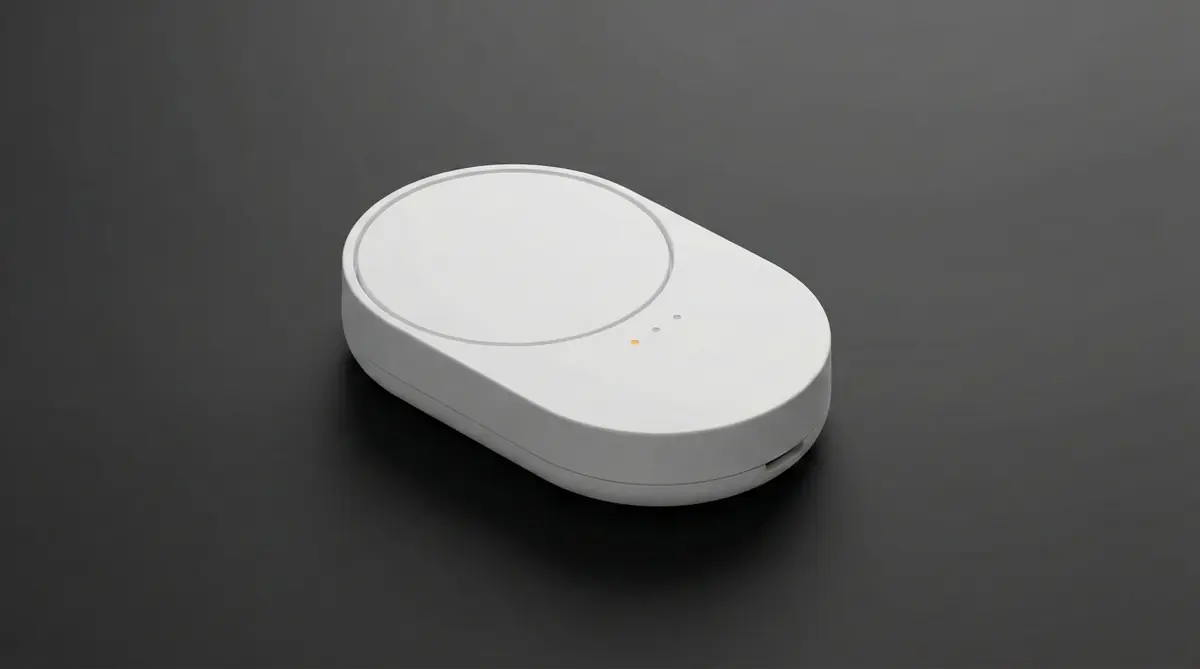
At first glance, BILRESA looks deceptively simple. There’s a rotary wheel you can turn left or right, a centre press, and a button at the bottom with three tiny LEDs. That’s it.
In practice, that bottom button is the key: pressing it cycles between three modes, each indicated by a different LED. Depending on the active mode, the wheel and the press events suddenly mean different things. Same physical controls, different logical buttons.
Once you realise this, the rest of the behaviour starts to make sense - including why Home Assistant later claims the device has nine buttons.
What’s the Matter?
Before going further, it’s worth having a quick mental model of how this all fits together - because this is where things went sideways for me.
Matter is this whole new kid on the block that is supposed to fix all our smart home problems. It’s basically yet another standard, which works either via Wi-Fi or via Thread - and for the second one you need something called a border router.
Matter, Thread, and IPv6 - the short version:
- Matter is the application layer - the rules for how devices talk to each other.
- Thread is a low‑power mesh network that Matter can run on.
- Thread requires IPv6.
- A border router bridges that Thread network to your normal home LAN.
Turns out lots of people will have a border router already - for example, the Google’s Nest Hub (2nd gen) and Nest Hub Max have a Thread radio, and Apple’s HomePod mini does too.
And so I thought, "great, I’ve got one of these" - because Thread is what IKEA has chosen for their products.
So I came back home and followed the instructions to see how this thing works first, and the Google Home app added the device with no issues whatsoever. Magic! Some more instructions later, I’m trying to add it to my Home Assistant setup. And lo and behold, I get a lovely "Error 1".
Uh. Okay. Go go error logs.
INFO [matter_server.server.device_controller] Starting Matter commissioning using Node ID 9 and IP fd9c:7645:21a:1:e409:a63c:4332:2a26.
CHIP_ERROR [chip.native.IN] SendMessage() to UDP:[fd9c:7645:21a:1:e409:a63c:4332:2a26]:5540 failed: src/inet/UDPEndPointImplSockets.cpp:417: OS Error 0x02000065: Network is unreachable
CHIP_ERROR [chip.native.SC] Failed during PASE session pairing request: src/inet/UDPEndPointImplSockets.cpp:417: OS Error 0x02000065: Network is unreachable
ERROR [matter_server.server.client_handler] Error while handling: commission_on_network: Commissioning failed for node 9.
Oh. Network is unreachable. Does that mean "computer says no"?
IPv6
This is where past-me sabotaged present-me.
When Home Assistant tried to commission the device, the logs showed an address starting with fd… and then immediately complained that the network was unreachable... I found that suspicious. I’ve seen those before. Where did I see that before…

As it turns out that Matter requires IPv6. Thread itself is IPv6-only, and the border router is effectively bridging an IPv6-only mesh into your LAN. So if that’s disabled anywhere along the path, things fall apart in fairly unhelpful ways. Google Home setup worked through Google’s proprietary magic. Home Assistant follows the protocol. Oh well.
In my case, IPv6 had been disabled on purpose years ago. Back then it caused more trouble than it was worth, and I simply never flipped it back on. So my HA has had a nice, static v4 address, but was never given a v6 one.
After a long evening of learning how IPv6 works (and carefully enabling it without breaking everything else), I switched Home Assistant to automatic IPv6 (which, as it turns out, is important too) and rebooted the relevant bits. Instantly, the BILRESA remote showed up and pairing just… worked.
Woo‑hoo!
So it turns out the way this works is that the border router is essentially an access point (I’m simplifying things, please don’t cancel me).
Automations

Once it’s paired, Home Assistant exposes nine entities. Which is impressive, considering the remote very clearly does not have nine buttons.
What’s happening is that a toggle at the bottom of the remote effectively remaps the wheel and press actions to a different set of logical buttons. This is indicated by three LEDs.
And yes, there is no entity that tells you which mode the remote is currently in.
But that’s fine. We get nine buttons. I can work with that.
I’ve started with a boring one - the lights. A few iterations in, I got the following:
alias: Bilresa lights
mode: single

trigger:
  - platform: state
    entity_id:
      - event.bilresa_scroll_wheel_button_1
      - event.bilresa_scroll_wheel_button_2
      - event.bilresa_scroll_wheel_button_3
      - event.bilresa_scroll_wheel_button_4
      - event.bilresa_scroll_wheel_button_5
      - event.bilresa_scroll_wheel_button_6
      - event.bilresa_scroll_wheel_button_7
      - event.bilresa_scroll_wheel_button_8
      - event.bilresa_scroll_wheel_button_9

condition:
  - condition: template
    value_template: >
      {{ trigger.to_state is not none and trigger.to_state.attributes.event_type is defined }}

variables:
  presses: "{{ trigger.to_state.attributes.totalNumberOfPressesCounted | int(0) }}"

  map:
    event.bilresa_scroll_wheel_button_1: { light: light.desk, kind: inc }
    event.bilresa_scroll_wheel_button_2: { light: light.desk, kind: dec }
    event.bilresa_scroll_wheel_button_3: { light: light.desk, kind: toggle }

    event.bilresa_scroll_wheel_button_4: { light: light.big, kind: inc }
    event.bilresa_scroll_wheel_button_5: { light: light.big, kind: dec }
    event.bilresa_scroll_wheel_button_6: { light: light.big, kind: toggle }

    event.bilresa_scroll_wheel_button_7: { light: light.night, kind: inc }
    event.bilresa_scroll_wheel_button_8: { light: light.night, kind: dec }
    event.bilresa_scroll_wheel_button_9: { light: light.night, kind: toggle }

  target_light: "{{ map[trigger.entity_id].light }}"
  kind: "{{ map[trigger.entity_id].kind }}"

  step: >
    {% if kind == 'inc' %}
      {{ [presses * 10, 100] | min }}
    {% elif kind == 'dec' %}
      {{ [presses * -10, -100] | max }}
    {% else %}
      0
    {% endif %}

action:
  - choose:
      - conditions: "{{ kind in ['inc','dec'] and presses > 0 }}"
        sequence:
          - service: light.turn_on
            target:
              entity_id: "{{ target_light }}"
            data:
              brightness_step_pct: "{{ step }}"

      - conditions: "{{ kind == 'toggle' and presses == 1 }}"
        sequence:
          - service: light.toggle
            target:
              entity_id: "{{ target_light }}"
This automation maps the three LEDs on the remote to three lights (desk, big, night) and allows me to either toggle them by pressing the wheel or control their brightness by turning the wheel clockwise or counter‑clockwise.
That's a good start. Can't think of anything else right now (well, okay, that's not true, but it's out of scope of this post).
Conclusion
I’m glad I bought it. Not because it was plug‑and‑play (it wasn’t, however that was kind of my fault), but because it forced me to actually understand how Matter, Thread, and my own network fit together.
BILRESA itself is a surprisingly capable little controller once you embrace the fact that it’s stateless and a bit opinionated. Three modes, nine logical buttons, no feedback about where you are - but plenty of flexibility if you’re willing to do the thinking in Home Assistant.
My home Matters now (gee, thanks, brain). And more importantly, the next Matter device I bring in hopefully won’t send me down an rabbit hole quite as deep as this one did.